12/13/2010

Final Project Summary

I started my Portfolio Project researching web sites that provide free html templates along with a free hosting. I stumbled upon few different web sites, such as CirclePad, Weebly, Wordpress, and Cloudaccess. I based my choice on such criteria as usability and simplicity of the web site builder, number of professionally looking designs, presence of advertisements on the final web site pages.
As a result, I opted for Weebly, since it met all aforementioned criteria. Weebly allows registering third level domain for free, for example, happylenz.weebly.com. Users are able to choose from dozens of available designs, which can be changed at their discretion. Elements on the page can be added with drag-n-drop function. Provided elements include picture, video, contact form, flash, slide show, photo gallery, and many others. On my web site I utilized items such as title, paragraph with picture, photo gallery, and custom html object. I also integrated a blog feed from my account at blogger.com, and videos from youtube utilizing embedded code and custom html options.
I chose a neutral design for my web site because simple and neat look is the key to success in the world of web design.
In my project I included different kinds of media such as video and photos, as visual images always facilitate transmission of information and are readily perceived by readers. On the School Achievements page, I placed my school works such as Second Life video that was presented in this class. It was my first work experience with video material that encompassed script writing, audio and video editing, along with enhancing of my team building and leader skills.  Works from my Design I class illustrate my creativity and artistic skills.
On the Contact Me page, I posted links to my profiles in various social networks, such as Facebook, LinkedIn, CinchCast, Twitter and my PLN network based on StumbleUpon. I did not post any personal information, such as mobile phone number or address in order to protect my identity from stealing.
In order to attract potential employers, I placed my resume on one of the pages. In the resume I included information about my programming skills, past working experience and education.
It is highly important to have a well-written resume as, according to my experience, employers base their choice of candidates for interview primarily on the provided resume.
In conclusion, I can say that the final project not only reflected skills that I obtained in the college and during my career of the web developer, but also helped to organize all information in an accessible form of web portfolio.

11/30/2010

Networks and Protocols

Internet Service Provider (ISP) is an organization that provides Internet access services and other Internet-related services.
ISP services may include:
• Internet access via dial-up and cable;
• Wireless Internet access;
• Allocation of the disk space for the storage and maintenance of the websites (hosting);
• Support of mailboxes or virtual mail servers;
• Placement of the customer's equipment on the service provider site;
• Rent of virtual dedicated and virtual private servers (VDS or VPS);
• Data Backup;
• and others.

Internet providers can be divided into several types according to  the services they provide:
• Access providers;
• Hosting providers;
• Backbone  providers;
• Channel providers;
• Last mile providers;
• and others.


In order to ensure compatibility of different networks and their component, Defense Advanced Research Projects Agency (DARPA) invented  a Transmission Control Protocol/Internet Protocol (TCP / IP) during 1970s.
TCP / IP is a set of network protocols according to which computers establish communication with each other. The Internet Protocol Suite is just snippets of code installed on the operating system and open up access to the protocols. TCP / IP is the standard, so the TCP / IP applications on the computer with Windows OS are able to successfully communicate with the same applications installed on the UNIX machine. During the initial period of network development, in 1983, engineers have developed a seven-layer Open Systems Interconnection (OSI) model to describe the process of network communication between the computers. The OSI model consists of physical, data link, network, transport, session, presentation and application levels. Administrators, who constantly work with the Internet and TCP / IP, mainly deal with the network, transport and application layer, but for a successful trouble shooting it is necessary to know the other levels.

Only 13% (570 million addresses) remained
in the global free pool as of 2008.
Internet Protocol Version 6 (IPv6) is a version of the Internet Protocol that was designed to improve Internet Protocol version 4 (IPv4). A number of limitations were removed from version 6, such as the length of the IP-address increased from 32 to 128 bits (i.e., it expanded to 340 trillion addresses), which solves the exhaustion problem of the available address space. In order to improve the performance of routers IPv6 introduces advanced packet headers, enhances protection of information (such as embedded encryption algorithm with a 64-bit key), simplifies the process of device configuration (introduced a feature of autoconfiguration). It became possible to assign priority levels to packets. In addition, IPv6 is upward compatible with IPv4.


Version of IPv6 is designed to develop and expand the Internet in order to ensure openness of information, both for providers and users. It is important to note that the introduction of IPv6 allows not only significantly reduce operating costs, but also expand the range of services.

Due to a rapid development of the Internet technologies, online analogs were provided for many offline services. For instance, regular phones now compete with Voice over IP (VoIP)  telephony. VoIP is a communications system, providing a transmission of the speech signal over the Internet or any other IP-based networks. 


Works Cited: http://www.personal.psu.edu/dvm105/blogs/ipv6/2009/01/  
http://www.youtube.com/watch?v=QDNxVwQwj2U 
http://en.wikipedia.org/wiki/TCP/IP_model 
http://en.wikipedia.org/wiki/Internet_service_provider


11/23/2010

Networking

Currently, local area networks (LAN) have a very broad distribution. This is due to several reasons:
- The union of computers in the network allows saving money by reducing maintenance costs of computers
- Local networks provide users with a mailbox in order to send messages to other computers, where documents are delivered from one computer to another in the shortest period of time;
- Local networks with special software organize better sharing of files.
Among other things, in some areas it is simply impossible work without the LAN. These areas are: banking, warehousing operations of large companies, libraries electronic archives, etc. In these cases every single workstation can not store all the information (mainly due to its large volume). Network allows selected (registered on the file server) users to access the information, and network operator grants that access.

There are three main types of computer networks:
- Local Area Network (LAN);
- Wide Area Network (WAN);
- Global Computer Network (Internet).
In addition, each of these networks can be:
- A single server - the network is served by one file server (FS);
- A multi-server - network served by several FS;
- Distributed - Two or more LANs that are connected by internal or external bridge (bridge or interconnection controls process of exchanging data packets between one cable system and another).


Local Area Network - a group of computers that can communicate with each other, share peripheral equipment (e.g., hard drives, printers, etc.) and contact remote central computer or other local networks. LAN can consist of one or more file servers, workstations and peripherals. Users can share the same files, such as data and programs, send messages directly between workstations and protect files with powerful protection tools. The main types of LANs are Ethernet and ARCNET. Moreover, Ethernet can have multiple types of cables:
- Thin Ethernet cable, also known as "Thinnet", has a number of benefits, such as lower cost of the cable and a usage of equipment that is easier to install;
- Thick Ethernet cable, also known as "Thicknet", has received its name due to the use of standard, or a thick Ethernet cable. Thick cable allows connecting greater number of computers in the system and increasing the distance between them. However, this cable is more expensive and its installation is more complicated comparing to a thin Ethernet cable;
- Ethernet over twisted pair. It is cheaper than aforementioned cables and easier to install.
Ways of organizing (topology) of Computer Networks is the physical layout of network components (cables, stations, gateways, splitters, etc.). 
There are three main topologies: star, ring and bus.
In the networks with “Star” topology workstations are connected directly to the file server, but not connected with each other.
In the networks with the "Ring" topology file server and workstations are connected by cable and create a shape of the ring; Packets from one workstation can go through several other workstations before they reach the file server.
In the network with “Bus” topology all workstations and file server are connected to a central cable, called the bus.
Hardware connectivity devices, such as hubs, switches or routers, are the center of data transmission.
The simplest type of such devices is a network hub which works on the physical level of Open Systems Interconnection (OSI) model and simply repeats the data from input port and sends it to output ports.
The next type of devices is network switches which are now widespread. Operating at the data link layer of network protocols, they copy MAC-addresses of connected computers, IDs of the network cards and then forward the packet only to that computer, which MAC-address is written in the packet. Switch can have a dedicated port, so-called UpLink, designed to send packets that haven’t found a recipient in the local area network. 


Let’s take a look at the routers.  They work at the network level of OSI model. A router typically has two IP-addresses – one for the outside world and one for the local network. In a local network router can distribute IP-address via Dynamic Host Configuration Protocol (DHCP) and control valid IP-addresses. Typically, in this case the router is a gateway for computers in a local network. Router’s external address is configured by analogy with a computer, and can be both static and dynamic.


11/16/2010

Getting More Out of the Internet

What we most appreciate about the Internet is its vast variety of information. Unfortunately, such a diversity of information makes it difficult to control its accuracy. In order to ensure the relevance and accuracy of the information, many web sites are specially certified.  For example, such organizations as URAC and HONcode provide accreditation of health and medicine related web sites. Web sites that meet standards of aforementioned agencies are entitled to display symbols of URAC and HONcode on their web pages.


Someone may call the Internet a storehouse of knowledge, some an information dump. Huge amount of thematic resources requires certain skills to navigate among them. Skillful application of the latest technological advances allows easing our lives by automating many processes, such as paying bills. Now this procedure is available online for owners of the electronic bank accounts, where paper bills were replaced by e-bills, thus accelerating and facilitating transactions between payers and banks. However, when you share your personal information online, you should always be aware of security issues, despite all advances in data protection, it is still don’t guarantee 100% protection from hacker attacks.


More and more people prefer online education to the traditional one. Remote courses are convenient, as they provide access to the information from any part of the world 24/7. In conjunction with Personal Learning Networks (PLN), online education can become a powerful tool in the hands of students and teachers.
Incomparable advantage of the Internet is the access to numerous websites containing information about various products and services. Now in 10 minutes you can get a complete overview of the latest brand car and its technical parameters, and get a price quote. This allows users to chose an item online and then buy it in the regular store.

Many products can also be ordered in the online stores, which are also referred to as a marketspace. You can find almost anything online, starting with kitchen utensils and finishing with software. Some software is available for free download and is called freeware, other (Shareware) is available for downloading for informational purposes only and requires purchasing after the trial period. Many programs can be found on the torrent web sites (like Pirate Bay) that utilize p2p technology to transfer data, i.e. from one user to another.
Sources: http://www.youtube.com/watch?v=6TLPtSLtM38

Final Project Phase One

Currently I'm enrolled in the Digital Media program, web track. My ultimate career goal is a become a professional web developer and eventually own a business or to be a head of a large company. Profession of web developer embraces vast variety of programming skills. Before starting a career, candidate has to obtain knowledge of programming languages such as PHP, JavaScript, HTML, and CSS; be able to effectively utilize software like web server Apache, MySQL database, Wordpress publishing platform, PHPBB forum, etc. 
The software that I found most convenient to use was Adobe Dreamweaver. It suits both for beginners and professionals, it has a great number of useful tools, such as tags lists, visual elements, text formatting options, that are very handy for web site development . One of the Dreamweaver's features that I use the most is auto completing tag option that provides you all possible suggestions for tag once you started typing it.

Steps I would follow to build my web portfolio:
1. Find free design template online. I chose to use Droopal or Joomla engines as they provide all the necessary tools for a fast and high quality web sites building process 
2. Decide what kind of information I will place on my portfolio. It would contain approximately between 4-7 pages, including my resume and examples of my works, my biographical facts,and links to the resources that I often use. I might also connect my Twitter or Blogger feeds using built-in widgets for aforementioned web site engines. 
3. Create web pages and add a content.
4. Upload on the web-hosting or simply utilize a publishing platform that comes along with blog or web site, such as Wordpress.

11/09/2010

Portals

Internet abounds with information of different kind. Therefore, in order to make information access more convenient, some of the web sites combine links for different kind of thematic resources. These web sites are called portals, for instance, Yahoo or MSN.

Such services are convenient to use, as they reduce the time spent for data search. Such web portals attract large flow of visitors which makes them also beneficial for advertisers, placing their advertisements on the portals.
Portals can be divided into several categories:
1. Personal (Horizontal)
2. Vertical
3. Industrial
Personal portals enable users to customize website page according to their certain interests and preferences.
Horizontal portals are designed for a narrower range of consumers, thus they include more detailed information on a chosen subject. For example, USA.gov. or portal dmoz.org contain links for different theme web sites.
Portals that publish information related to a particular area of industry such as health care, automobiles, insurance, or food manufacturing, called industrial portals. For example, such web sites as The Car Portal, Health.org and others
Corporate portals are intended to provide access to corporate information for employers, employees, customers and business partners. Users of Corporate portals are able to share their personal information; employees from different departments can exchange data and collaborate with each other. Great example of such portal is web site of NCCC.
Due to the high rate of information exchange, the Internet has become an indispensable platform for the placement of rapidly changing data such as weather reports, traffic jams or breaking news. For example, Weather.com web site reflects not only the most recent data about weather, but also provides videos of natural disasters, downloadable applications for your computer or smart phone. Also inquisitive users can find tips about their hobbies or travelers info.

Personal Learning Network

With the development of Web technology it has become very convenient to gather links to the useful informational resources into the special Personal Learning Network (PLN) which is advantageous during educational and working process. It helps to connect teachers and students, employers and employees. Creating, searching and sharing of information develop a unique symbiosis between users and expand boundaries of communication.  Currently, the most frequently visited resources that I use are the web sites about programming, business, as well as various online dictionaries and thesaurus.
To build my PLN I chose StumbleUpon , as it not only allows bookmarking web pages, but also supports sharing of this information with other members of the network.
Steps that I've followed to create my PLN:
1. Created a blog to share my own ideas and follow other people posts.
2. Registered an account for StumbleUpon in order to do social bookmarking
3. Signed-up for iGoogle which allows to follow blogs and provides tools for fast access to the different resources like dictionaries, latest news and videos.
4. Registered in LinkedIn (professional network) in order to extend my professional connections and explore current job market requirement.
Though it is important not to "over do" you PLN by registering for too many services which will put you into informational chaos.
Wordle: PLN

Currently my iGoogle page contains links to the latest new about Python and PHP programming languages, daily IT and technology news; information about careers, dictionary search line and To-Do list.  


Advantage of PLN is being around large community of users, communicating with people from all over the world whose multicultural experience creates unique environment for learning.

11/07/2010

Sinch

11/04/2010

Social Networks and Blogs

Social networks are aimed to build an online community consisted of people with similar interests and / or activities. Communication takes place via the internal email service and instant messaging.

Also, there are social networks created to search for objects of one’s interest: web sites, listening to music, reading books and so on.
In the social network you can usually publish information about yourself (date of birth, ducation, hobbies, etc.), based on which other participants can find you. One of the common features of social networks is the "Friends" and "groups".

For advertisers, social networks provide unique opportunities for direct contact with consumers. Every day, millions of users discuss companies, their products and services by sharing their opinions and impressions. As a result, network community can ruin (or vice versa), the reputation of a company with multi-million dollar turnover.

Many people do not realize that information posted on social networks can be found and used by anyone, including those who not necessarily have good intentions. Information about social network users can be found by their employers, parents, children, former or current wives or husbands, debt collectors, criminals, law enforcement and so on.

Blog is a web site, which main contents include regularly added entries that contain text, images or multimedia. Brief entries sorted in reverse chronological order (most recent entry on top) are common for blogs. Blogs are usually public and involve the reader, who may enter into a public debate with the author (in the comments to blog posts or their blogs).

People writing a blog are called bloggers. Combination of all blogs is called a blogosphere.


Blogs main characteristic is the ability of visitor to publish feedback (comments). This feature makes blogs a part of a social network environment that is more advantageous than e-mails, newsgroups, Web forums and chat rooms.


Sources: http://en.wikipedia.org/wiki/Blog
http://www.whatissocialnetworking.com/
http://radio-weblogs.com/0121664/categories/knowledgeManagement/

Spam and Viruses

Since the moment when user registered an email address, he becomes exposed to the risk of viruses or spam.

Worms can be divided into the two classes:

1. Worms, which are run by themselves without your knowledge.
2. Worms, which are activated only when the user opens an attached file.

The first type includes worms, which use errors in mail programs. Such errors are common in the most popular email programs like Outlook Express. For example, many viruses use error IFRAME, which was identified long ago by Microsoft and fixed by installing certain patches. However, worms utilizing this error are the most common.


Worms of the second type rely on the fact that user, for some reason, will open a file attached to the e-mail. In order to encourage the user to run an infected file, creators of worms use different techniques. The most common method is to replace some important documents with an infected file. Almost always worms have "double extensions". In this case, the attached file has a name like: Docl.doc.pif, pict.jpg.com. This principle considers that the e-mail clients do not display the full file name and user will not see the second real extension. When the user thinks that the file is a document or image, the file actually is an executable (with extension exe, com, pif, scr, bat, cmd). When the file is opened, the worm's body is activated.

Complete picture includes other varieties of viruses, such as macro viruses, Trojans and utilities for hidden administration. Although they do not belong to the worms, they can be distributed by the email.

Nowadays email users receive hundreds of spam email on a daily basis. Even though some email servers have inbuilt spam filter, some of the letters are still able to reach users’ mailboxes.

Spam letters usually are easy to determine. Typically, sender’s email address looks odd and suspicious - sd2fdsdf@dfdf.com, ddf243@hfyr.com, gdf2gd56@ggggg.com. But some spammers use "human" addresses. Sometimes it come to the point, where spammers use the address of a person from a famous company - Microsoft, IBM, etc. If you see that the sender email address has similar characteristics, it is better to delete such message immediately.
Subject is also an important criteria. What would you think, if you receive an email with the subject "Re: answer to your question?” And this message comes from the email address which you have never used and have never seen before? This is spam.

The vast majority of spam is used for advertising. Usually spammers advertise product or service, sometimes to increase the number of hits on the web site, more seldom for the viruses or Trojans distribution. But the common goal is to bring their information to the greatest possible number of recipients at a minimal cost. And the sender does not care about the composition of the audience, number is the most important.


Sources: http://en.wikipedia.org/wiki/Spam_%28electronic%29
http://www.online.tusc.k12.al.us/tutorials/viruses/viruses.htm
http://www.youtube.com/watch?v=FXpmgZAjP0o
http://www.cartoonstock.com/directory/c/computer_worms.asp

10/29/2010

Second Life, Phase 4

In the beginning of the video shooting process I met a few difficulties in coordinating the actions of each team member, but story board helped to organize the process as I could easily explain roles and responsibilities to each person and reach maximum productivity.
Since none of us were familiar with CamStudio software, we experimented with camera views and different perspectives before starting the actual filming process. Different scenes of the video were shot in the sequence of the story board and were named according to their content.
While editing our video materials, we divided them into 3 parts, thus each of the participants could edit the video in order to speed the process. After editing was completed, we uploaded the final cut on Jeff Guiher's external hard drive. I delegated the final pieces of the project to Jeff for final assembly and addition of the closing scene.

Second Life, Phase 4

For this project phase I created a story board with explanatory notes for each scene, including fragments of dialogues. This approach greatly facilitates understanding and visualization of the video scenario.
During this class, we started shooting the video. To reduce the amount of footage, it was decided to change the video size from Full Screen to 700x400 pixels.
Luckily this day was very favorable for the completion of filming, as the computer lab was free after the class and my team could continue working on the video. It took us 6 hours to film the movie, put all the scenes together utilizing Windows Movie Maker, and add some special effects to make the video look more professional.

Second Life, Phase 3

Today we spent all the class time searching and testing video and audio editing software. Proposed in the beginning of the project Screenr website was inappropriate for us as its users were required to publish their footage online. To replace the aforementioned web site, we found a program called CamStudio which is very simple and doesn’t require special technical skills. Thus it was immediately endorsed by all participants.
To voice our characters, we chose a program called Audiocity, which was recommended by one of the professors. Also, we found several variants of the robot voices that we can apply for one of our characters. It was decided to export most of the sound effects from the Youtube, through a web site http://www.listentoyoutube.com/, which extracts audio stream from video and saves it in mp3 format.

Second Life, Phase 2

Our story characters included the Creaper, giant monster, robot, zombie and a guy with the brain protruding from his head. That was enough to fulfill of our story.
During online communication, one of the team members experienced technical difficulties concerning incompatibility of Skype and Second Life on Mac OS. He was often disconnected from the Internet due to freezing of the operating system

Second Life, Phase 2

Today for the first time, I met with my team online via Skype to discuss the plot of our video, character selection and appropriate environments.
Before starting this phase, I asked each team member to come up with some ideas for our scenario. As a result of the discussion, we combined our ideas into one story, so each participant could contribute to the scenario development.
Our script was about a guy and a girl who meet the Creaper, which fraudulently lures them into a parallel dimension where the characters try to escape from zombies and the Creaper who tries to kill them after revealing his evil plan of kidnapping humans.
After the script approval, we chose our characters and environments, which included the abandoned castle, graveyard and zombies.

10/28/2010

E-mail

Email management is a very important process in the effective use of this tool. Managing contacts, groups, and attachments are all necessary in order to maximize usage. Managing your email account also includes being aware that some emails can contain unwanted advertisement such as spam and dangerous attachments such as viruses. It is important to flag junk mail and remove the unwanted mail. I have a great deal of experience using Microsoft Outlook in an office environment. As the text indicated organizing your contacts, groups and important documents help to organize time. Organization allows you to send to an entire group of users such as staff important updates. In order to send an e-mail to a specific group of the contacts, select name of the contact group in the To text box, instead of sending e-mails to the individual addresses.

To create a new contact, click an icon "Contacts" on the Windows Mail panel and then in the opened window click "Create a new contact". Windows Mail allows you to enter personal information about new contact, which may include name, home address, place of employment, marital status, as well as notes.

For convenience, incoming mail can be organized according to the special rules. E-mails are distributed into the folders basing on the keyword search in the title, address, or body of the mail. Letters, accidentally sent to the Deleted Items folder can be restored by dragging to another folder. Messages can be removed permanently from the Deleted Items folder by using command “Delete Items” from the “Edit” menu.

In all e-mail is most effectively used if you know the best ways to utilize all that it offers.


Sources: http://www.youtube.com/watch?v=WCKQW-dgSig&feature=related

10/22/2010

Second life, Phase 1


During the second class, we developed a story line; found several locations which can be used in the video scenes and browsed different stores looking for “freebie” items.   We changed the looks of avatars according to the characters in the script. 

Second life, Phase 1


During Introduction to Web technology class we were introduced to online game called “Second Life.” As it was our first experience with this game, we started from the basics which included learning the main control commands and buttons, search options and teleport functions. While interacting with a new virtual environment, we were exploring various game locations, buildings and online stores. Most of the items in the stores are sold for internal currency, the Linden dollar (L$), which exchange rate is 1 US$:269 L$.
Users are able to create an avatar to communicate with others gamers or participate in group activities. Utilizing the built-in editor, we learned different ways of changing the avatar’s appearance, including clothes, face and body features.

10/20/2010

E-mail Clients

Nowadays it is difficult to find a person who has never send a single message via Internet, whether they were using e-mail, instant messengers, IRC, web chats, blogs or social networking web sites. Benefits of online communication far surpassed regular ‘snail’ mail. Numerous advantages of online tools include simplicity of information and data exchange, high speed e-mail delivery, broadcasting and advertizing world wide, effective collaboration with friends, family members, or co-workers, sharing web content via social networks.

However, informal style of e-mail negatively affects the quality of written language. Also the ease of e-mail distribution may interfere with one’s interests, since messages can be easily forwarded to a wide amount of recipients without notifying an original sender.


Online communication requires unique identifier for each user. For instance, e-mail addresses which, despite their vast variety, share the same basic structure and include user ID, host name and a top-level domain (TLD).
In order to create, receive or send messages, e-mail clients or specialized online e-mail accounts are commonly used. E-mail client is special software to handle your correspondence. Most popular examples of e-mail clients are Microsoft Outlook, Microsoft Windows Mail, Microsoft Windows Live Mail, Opera Mail, and Mozilla Thunderbird. To interact with servers, e-mail clients utilize several protocols such as Post Office Protocol (POP), Simple Mail Transfer Protocol (SMTP), Internet Message Access Protocol (IMAP) and Hypertext Transfer Protocol (HTTP).
Usually most of the e-mail clients have similar structure of the message window and include following elements:
• The To line
• The Cc line
• The Bcc line
• The Subject line
• The Attach line
• The message body
• Signature file
E-mail clients are advantageous as they allow to organize correspondence in convenient for users order by utilizing folders tree and sometimes include time planning features as, for example, in Microsoft Outlook.


Sources: http://www.youtube.com/watch?v=YBzLPmx3xTU
http://itmanagement.earthweb.com/img/2007/11/spam100.jpg

10/17/2010

Career Goals

Presently I am enrolled in Digital Media associate degree program, web track. My current profession is a web developer. It is one of the few steps towards my ultimate professional goal of building successful career in the large company or being a head of my own business. According to my approximate estimation, it would take between five and seven years to reach this goal.
Knowledge that I obtained in this class, I was already familiar with and intensively applied in my career. Information search skills are crucial for me, as I always search for manuals, tutorials, books and learning videos online, in order to improve my knowledge or find solutions for complex programming situations. Understanding of web pages structure and HTML is a fundamental knowledge for those who start their career in web development, as content design, page layouts and their style are directly based on aforementioned skills.
Another task of great importance is to be familiar with diversity of browsers and their versions, for I have to be able to write cross-platform code which will be valid and can run correctly in any browser.
However, understanding of web technologies is significant not only for professionals, but also for average users; lack of computer skills in information society will cause obstructions and reduce quality of work performance. And I would highly encourage those, who think about becoming a web developer, to start learning as soon as possible since they have to cover a vast variety of topics and learn numerous programming approaches, in order to be competitive on a job market.

10/11/2010

Media and Business Search

The information contained in the text clearly presents material on how to use the internet as a research tool. The search tool that seems the most useful for specific research and more detailed search compilations is via the use of resources as lexixNexis which allows very specific and detailed information connected to scholarly and even business related research.  This search type  of specialized electronically collected data helps to complement the broader less refined searches done via standard search engines as it will allow many sources to be opened to you dependant upon the search criteria that is stated in the search.
 Accessing the information is only as easy as how easily the information is found in the website or whichever media is used. This is why searching within the website via a websites own search tool is essential as a tremendous amount of time and energy can be saved searching content through the use of search tools, rather than manual or visual searches.

Once material is found and used it is important that the information is cited correctly to avoid issues of plagiarism. 
Plagiarism is an important issue in both academic and business circles.  Since US law regards original ideas as intellectual property, in a court of law, unique thoughts are treated the same as physical objects.  While common knowledge and well known concepts need not be cited, specific ideas or text must always be cited to avoid committing intellectual theft.  According to Plagiarism.org, “…plagiarism is an act of fraud.  It involves both stealing someone else’s work and lying about it afterward.” (“What is Plagiarism?”).  In other words, using someone else’s ideas without giving them credit or citing them is an act of plagiarism.
Simply using standardized methods such as MLA not only protects the material from wrongful abuse but it adds a degree of weight and professionalism to one’s research and avoids possible problems such as being accused of plagiarism, which can lead to disaster whether one is a student or professional. 

In order to ensure one does not commit plagiarism, it is necessary to cite all primary sources including websites.  However, citing electronic resources is not always easy.  In fact, according to the Library of Congress website, “In some cases, [web] content can be posted without a clear indication of author, title, publisher or copyright date.  [In these cases you should] Look for available clues and give as much information as possible, including the URL and date accessed.” (“Citing Primary Sources: MLA).  Ideally, one would want to cite a web source with the author’s name and article name first.  However, as the above warns, often there is no author listed on websites so the alternative is just to give as much information as possible.  The Library of Congress also suggests that academic websites that list entire text sources including author’s name are among the most reliable found on the web.

In closing the essentials are knowing where and how to search for information, how to increase the likelihood that your search will yield useful information and the finally protect your work, reputation and the work of others through proper citation to avoid the conflicts associated with plagiarism.  


Work Cited:
“What is Plagiarism?” 2010. iParadigms, LLC. 10 Oct. 2010 <http://www.plagiarism.org/plag_article_what_is_plagiarism.html>
“Citing Primary Sources: MLA.” 2010. Library of Congress. U.S. Govt. 10 Oct. 2010 <http://www.loc.gov/teachers/usingprimarysources/mla.html#entirewebsite>
 
"Small Business Search Engine Optimization Marketing" 2010. 10 Oct. 2010 <http://www.youtube.com/watch?v=KXWxuCCwRNg>

10/05/2010

Search Engines

As information, posted online, was accumulating, it required extra search tools to browse through. 
There are few ways to find data online; they are based on different approaches, in order to meet specific users’ requests.
Jerry Yang and David Fillo were the first who came up with idea for organizing information into directories. Web sites were distributed between several directories depending on the content and relevance, in order to ease search by grouping similar web pages. Eventually, this directory was renamed into Yahoo and lately has been developed into Yahoo mass media corporation, providing not only search opportunities but also mail, shopping, news, and other services.
In spite of constant competition with directories, search engines still keep a leading role. Google, Bing, Ask, Altavista, Searchme, and others are aimed to fulfill any fancy users’ requests’; whether they look for pictures, articles, scientific works, music, or something else.  Moreover, as search engines were becoming more complicated, special query operators were integrated into engines, with a view to improve out-coming search results. For instance, query with a phrase in between quotation marks will return pages containing exact words in the given order.  Typing NOT before a keyword in the search box will display a content excluding that word. Though users should keep in mind that query operators may vary depending on the search engine. 


Vast results, returning by the search engines, do not always match user’s expectations as the useful links are mixed with irrelevant information. This issue can be avoided by using more powerful services, such as  LexisNexis, IngentaConnect, FindLaw, Hoover’s, Dun & Bradstreet, and Dialog, which organize search within a certain field of knowledge thus optimizing final results.

Sources used: http://www.youtube.com/watch?v=BNHR6IQJGZs&feature=related

9/28/2010

Web-page and Animation

In spite of the rapid technological progress, Internet is inaccessible frequently. And the only way to access webpage offline is to load one saved on the computer or use a printed copy.
Saving option is available through the Command Bar, where by clicking on Page button and then Save As, we can choose our way of storing webpage. Internet Explorer provides four different formats: webpage, complete; web archive, single file; webpage, HTML only, or text file.
Also there are several ways to get a hard copy. Printing is available through Command bar, drop down menu or hot keys Ctrl+P. Printed pages contain title and page number in their header, URL and date in the footer, which is set up by default.
To adjust browser window for individual needs, users can customize menus and other browser features; for example, show or hide menu bar by pressing Alt on the keyboard, add or change home page using Home button on the Command bar.
Users, going online, have to remember about their own security and risks of hacker attacks regardless. Anti-virus software and firewall is a must have for PC and Mac users since most of the viruses are written for these two operating systems (OS). Some of the programs combine anti-virus and firewall together, like Kaspersky Internet Security, leading brand on the anti-virus software market. Linux users are free from this problem as this OS is not well known and more over has its own security utilities.
Targets of hacker attacks are usually include online stores, electronic mail or any other pages that transmit credit card or personal information. Usually this security issue can be solved by using Secure Sockets Layer (SSL) certificates which are signed by certificate authority organization. Furthermore, using common sense, staying away from suspicious web-sites and avoiding sharing private information via e-mail will prevent users from many unjustified risks.

GoAnimate.com: Home page by Elena Moiseeva

Like it? Create your own at GoAnimate.com. It's free and fun!

9/23/2010

Cartoons Production Testing

GoAnimate.com: Spok and Blondie by Elena Moiseeva

Like it? Create your own at GoAnimate.com. It's free and fun!

RSS, Dropdown List and Suggested Sites

Reading news on the RSS feeds is one of the latest trends of the news delivery. Acronym RSS stands for Rich Site Summary; instrument for receiving updates, news, or blog posts from web-sites, which you are subscribed to.
Most of the popular browsers have built-it RSS applet; its icon usually can be found on the top of the browser window.  By changing the color, an icon will indicate whether current web-site supports RSS or not.
Users can add new RSS feed in a few different ways. The easiest one is to open certain web-site and click on the RSS icon. After you were redirected to the feed page, click on the Add button to complete the procedure. All stored RSS feeds are located in the Favorites Center, which you can access from the main menu or star shaped button on the top of your browser (may vary in different browsers).
        Another way to subscribe is through your Gmail account. The sequence of the steps will be similar with the only difference; in order to add web-site, we will need its URL copied and then pasted to the address box on the feed page. 
      The next useful feature built-in into Internet Explorer and other browsers is Address Bar Dropdown List, which provides instant access to recently visited web-sites. 
            In the same window, below recent web-sites we can see suggested sites. These choices are based on the browser statistics such as all visited web-sites, most popular pages, bookmarked sites, etc. This option can be turned on or off in the menu Tools – Command Line. 


9/20/2010

URL and navigation

For convenience and ease of memorizing, each web-site has its unique address called Uniform Resource Locator (URL), which we enter in the address box on the top of the browser. 
Address box is the one of the few common browser features which we utilize for navigation.  There are several ways we can use to navigate through the Internet: using address box; back, forward and recent pages buttons, home page button and favorites.  
Combined together they create powerful and flexible tool  for better Internet browsing.

Web Servers


While browsing the Internet we go through hundreds of web sites, but we have not given much thought about what they consist of or their structure. Web page that we see on our screen is only an outer shell. Do many people know what lies behind pretty design, illustrations and paragraphs of text? 

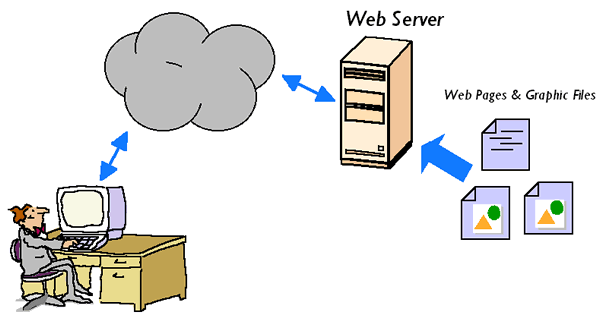
To display a web page on the computer, browser has to send a request to the remote server which stores all the information about the web site. Browser is a client side application as it runs on the user’s computer, whilst the web-server is a server side which contains all the files with executable code.  
Most common dynamic programming languages are PHP, Perl and Asp.Net which run on the remote server. In opposite, client side programming languages such as Java or Java Script are executed on the user's computer

For more information click the link below

Web page

Web-site is a complex product designed by web-developers, and including from several to hundreds of pages which are built using Hyper Text Markup Language, also well known as HTML. We can find several features that all pages have in common, for example, logo, links, images, copyright statement, privacy policy and a search tool.

Most of the web pages are dynamic which means that they constantly change their content depending on various conditions such as type of the user, time of the day, previously saved setting, etc.
More information about dynamic web-sites is provided by the link below.

About dynamic web-pages http://www.wisegeek.com/what-is-a-dynamic-web-page.htm

9/14/2010

Wordle

Wordle: My wordle

9/12/2010

Net Neutrality

This article is about the concerns of regulation in an industry that has an effect on the daily lives of many people. The internet has come to the point where it can almost be defined as a necessity of daily life. So the main questions are can such a necessity be regulated in order to increase profits for the provider since seemingly the providers have addicted their clientele, or should the net be simply be allowed to be run naturally like the invisible hand of capitalism?
Currently there is no concise enforceable legal code that enforces net neutrality or its non-neutrality, other than those applications of copyright law, so it is interesting to see how this argument will be settled. In the author’s opinion, the internet has become a source of commerce, and environment similar to that of an ocean, and as we know once international waters are entered we leave behind the laws of the country and are governed by the laws of the sea. The internet is an ocean, its content is international, and the providers of access to have the right to charge access of entrance, but how can they have the right to control where you navigate, how you navigate and where you go once you paid entrance. There are many ways to profit from internet commerce, the arguments made from the service providers do make sense in the regard of they helped to make the ocean possible, but they did not fill the ocean with content. So it seems that if a provider did, successfully gain the right to de-neutralize the net, it would seem obvious that such an enormous vacuum would be created that it would certainly leave vacancy available for a net-neutral provider to compete against those entities that wish to legally bottleneck the net.
The relationship between Google and Verizon appears to be almost a natural coalescence of the two sides of the debate as it is obvious that such an ideological chasm needs the cooperation of all parties involved, including the clientele. Ultimately, the shareholders and subscribers, the people who pay will decide this debate as it will be their wallet that makes the ultimate decision.

9/07/2010

Chapter 1


This chapter gave a brief over view of how the internet and web was created and its subsequent evolution. The internet was initially set-up as a means for nationally security so that computer information could be shared and not centralized. It was believed, should a Soviet attack occur, that having computer resources decentralized and connected minimized the risk of all information being lost as during attack. The foundation of the internet was Arpanet which basically linked universities, government and firms together. An important development during the evolution of the internet was the inception of electronic mail.  E-mail was instantly popular amongst universities as it allowed immediate transmission of data between institutions.

Another important development of the internet is based upon the ability of various operating systems and devices to access information and communicate. The ability to universally log-on to the internet stems from the universal use of Transmission Control Protocol (TCP) which controls flow control over the network and error checking for packets (packets being another development for the transmission of data not as a continuous stream of data, rather data that has been broken up and transmitted as smaller packets) and Internet Protocol (IP) which is the address as to where to send the packets. This combination of protocols abbreviated as TCP/IP was mandated to be used by all devices in 1983, thus allowing universal access to the internet.

Another significant milestone in the development of the internet came about in 1992 where the government allowed commerce to take place over the internet. This was a major driver that advanced the internet from academia into the private sector as now business globally could be accomplished very easily. Commerce on the internet allowed rapid expansion and investment into the communication industry.

I believe that one of the greatest achievements of the internet is its ability to allow people to instantly communicate and share knowledge.