In spite of the rapid technological progress, Internet is inaccessible frequently. And the only way to access webpage offline is to load one saved on the computer or use a printed copy.
Saving option is available through the Command Bar, where by clicking on Page button and then Save As, we can choose our way of storing webpage. Internet Explorer provides four different formats: webpage, complete; web archive, single file; webpage, HTML only, or text file.
Also there are several ways to get a hard copy. Printing is available through Command bar, drop down menu or hot keys Ctrl+P. Printed pages contain title and page number in their header, URL and date in the footer, which is set up by default.
To adjust browser window for individual needs, users can customize menus and other browser features; for example, show or hide menu bar by pressing Alt on the keyboard, add or change home page using Home button on the Command bar.
Users, going online, have to remember about their own security and risks of hacker attacks regardless. Anti-virus software and firewall is a must have for PC and Mac users since most of the viruses are written for these two operating systems (OS). Some of the programs combine anti-virus and firewall together, like Kaspersky Internet Security, leading brand on the anti-virus software market. Linux users are free from this problem as this OS is not well known and more over has its own security utilities.
Targets of hacker attacks are usually include online stores, electronic mail or any other pages that transmit credit card or personal information. Usually this security issue can be solved by using Secure Sockets Layer (SSL) certificates which are signed by certificate authority organization. Furthermore, using common sense, staying away from suspicious web-sites and avoiding sharing private information via e-mail will prevent users from many unjustified risks.
GoAnimate.com: Home page by Elena Moiseeva
Like it? Create your own at GoAnimate.com. It's free and fun!
9/28/2010
9/23/2010
Cartoons Production Testing
GoAnimate.com: Spok and Blondie by Elena Moiseeva
Like it? Create your own at GoAnimate.com. It's free and fun!
RSS, Dropdown List and Suggested Sites
Reading news on the RSS feeds is one of the latest trends of the news delivery. Acronym RSS stands for Rich Site Summary; instrument for receiving updates, news, or blog posts from web-sites, which you are subscribed to. 

Most of the popular browsers have built-it RSS applet; its icon usually can be found on the top of the browser window. By changing the color, an icon will indicate whether current web-site supports RSS or not.
Users can add new RSS feed in a few different ways. The easiest one is to open certain web-site and click on the RSS icon. After you were redirected to the feed page, click on the Add button to complete the procedure. All stored RSS feeds are located in the Favorites Center, which you can access from the main menu or star shaped button on the top of your browser (may vary in different browsers).
Another way to subscribe is through your Gmail account. The sequence of the steps will be similar with the only difference; in order to add web-site, we will need its URL copied and then pasted to the address box on the feed page.
The next useful feature built-in into Internet Explorer and other browsers is Address Bar Dropdown List, which provides instant access to recently visited web-sites.
9/20/2010
URL and navigation
For convenience and ease of memorizing, each web-site has its unique address called Uniform Resource Locator (URL), which we enter in the address box on the top of the browser.
Address box is the one of the few common browser features which we utilize for navigation. There are several ways we can use to navigate through the Internet: using address box; back, forward and recent pages buttons, home page button and favorites.
Combined together they create powerful and flexible tool for better Internet browsing.
Web Servers
While browsing the Internet we go through hundreds of web sites, but we have not given much thought about what they consist of or their structure. Web page that we see on our screen is only an outer shell. Do many people know what lies behind pretty design, illustrations and paragraphs of text?
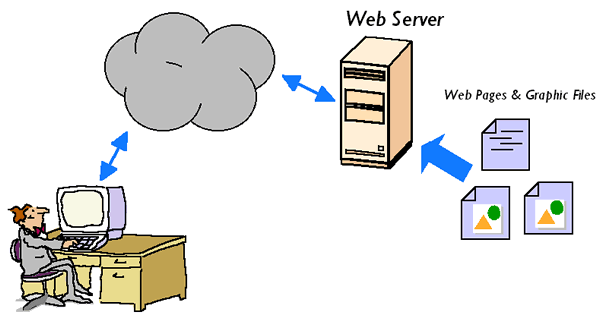
To display a web page on the computer, browser has to send a request to the remote server which stores all the information about the web site. Browser is a client side application as it runs on the user’s computer, whilst the web-server is a server side which contains all the files with executable code.
Most common dynamic programming languages are PHP, Perl and Asp.Net which run on the remote server. In opposite, client side programming languages such as Java or Java Script are executed on the user's computer
For more information click the link below
Web page
Web-site is a complex product designed by web-developers, and including from several to hundreds of pages which are built using Hyper Text Markup Language, also well known as HTML. We can find several features that all pages have in common, for example, logo, links, images, copyright statement, privacy policy and a search tool.
Most of the web pages are dynamic which means that they constantly change their content depending on various conditions such as type of the user, time of the day, previously saved setting, etc.
More information about dynamic web-sites is provided by the link below.
About dynamic web-pages http://www.wisegeek.com/what-is-a-dynamic-web-page.htm
Most of the web pages are dynamic which means that they constantly change their content depending on various conditions such as type of the user, time of the day, previously saved setting, etc.
More information about dynamic web-sites is provided by the link below.
About dynamic web-pages http://www.wisegeek.com/what-is-a-dynamic-web-page.htm
9/14/2010
9/12/2010
Net Neutrality
This article is about the concerns of regulation in an industry that has an effect on the daily lives of many people. The internet has come to the point where it can almost be defined as a necessity of daily life. So the main questions are can such a necessity be regulated in order to increase profits for the provider since seemingly the providers have addicted their clientele, or should the net be simply be allowed to be run naturally like the invisible hand of capitalism?
Currently there is no concise enforceable legal code that enforces net neutrality or its non-neutrality, other than those applications of copyright law, so it is interesting to see how this argument will be settled. In the author’s opinion, the internet has become a source of commerce, and environment similar to that of an ocean, and as we know once international waters are entered we leave behind the laws of the country and are governed by the laws of the sea. The internet is an ocean, its content is international, and the providers of access to have the right to charge access of entrance, but how can they have the right to control where you navigate, how you navigate and where you go once you paid entrance. There are many ways to profit from internet commerce, the arguments made from the service providers do make sense in the regard of they helped to make the ocean possible, but they did not fill the ocean with content. So it seems that if a provider did, successfully gain the right to de-neutralize the net, it would seem obvious that such an enormous vacuum would be created that it would certainly leave vacancy available for a net-neutral provider to compete against those entities that wish to legally bottleneck the net.
The relationship between Google and Verizon appears to be almost a natural coalescence of the two sides of the debate as it is obvious that such an ideological chasm needs the cooperation of all parties involved, including the clientele. Ultimately, the shareholders and subscribers, the people who pay will decide this debate as it will be their wallet that makes the ultimate decision.
Currently there is no concise enforceable legal code that enforces net neutrality or its non-neutrality, other than those applications of copyright law, so it is interesting to see how this argument will be settled. In the author’s opinion, the internet has become a source of commerce, and environment similar to that of an ocean, and as we know once international waters are entered we leave behind the laws of the country and are governed by the laws of the sea. The internet is an ocean, its content is international, and the providers of access to have the right to charge access of entrance, but how can they have the right to control where you navigate, how you navigate and where you go once you paid entrance. There are many ways to profit from internet commerce, the arguments made from the service providers do make sense in the regard of they helped to make the ocean possible, but they did not fill the ocean with content. So it seems that if a provider did, successfully gain the right to de-neutralize the net, it would seem obvious that such an enormous vacuum would be created that it would certainly leave vacancy available for a net-neutral provider to compete against those entities that wish to legally bottleneck the net.
The relationship between Google and Verizon appears to be almost a natural coalescence of the two sides of the debate as it is obvious that such an ideological chasm needs the cooperation of all parties involved, including the clientele. Ultimately, the shareholders and subscribers, the people who pay will decide this debate as it will be their wallet that makes the ultimate decision.
9/07/2010
Chapter 1
This chapter gave a brief over view of how the internet and web was created and its subsequent evolution. The internet was initially set-up as a means for nationally security so that computer information could be shared and not centralized. It was believed, should a Soviet attack occur, that having computer resources decentralized and connected minimized the risk of all information being lost as during attack. The foundation of the internet was Arpanet which basically linked universities, government and firms together. An important development during the evolution of the internet was the inception of electronic mail. E-mail was instantly popular amongst universities as it allowed immediate transmission of data between institutions.
Another important development of the internet is based upon the ability of various operating systems and devices to access information and communicate. The ability to universally log-on to the internet stems from the universal use of Transmission Control Protocol (TCP) which controls flow control over the network and error checking for packets (packets being another development for the transmission of data not as a continuous stream of data, rather data that has been broken up and transmitted as smaller packets) and Internet Protocol (IP) which is the address as to where to send the packets. This combination of protocols abbreviated as TCP/IP was mandated to be used by all devices in 1983, thus allowing universal access to the internet.
Another significant milestone in the development of the internet came about in 1992 where the government allowed commerce to take place over the internet. This was a major driver that advanced the internet from academia into the private sector as now business globally could be accomplished very easily. Commerce on the internet allowed rapid expansion and investment into the communication industry.
I believe that one of the greatest achievements of the internet is its ability to allow people to instantly communicate and share knowledge.
Subscribe to:
Comments (Atom)